# 《Nginx核心技术》第14章:使用Nginx搭建流媒体服务器实现直播
作者:冰河
星球:http://m6z.cn/6aeFbs (opens new window)
博客:https://binghe.gitcode.host (opens new window)
文章汇总:https://binghe.gitcode.host/md/all/all.html (opens new window)
星球项目地址:https://binghe.gitcode.host/md/zsxq/introduce.html (opens new window)
沉淀,成长,突破,帮助他人,成就自我。
- 本章难度:★★☆☆☆
- 本章重点:用最简短的篇幅介绍Nginx最核心的知识,掌握使用Nginx搭建流媒体服务器实现直播,并能够灵活运用到实际项目中,维护高可用系统。
大家好,我是CurleyG~~
今天给大家介绍《Nginx核心技术》的第14章:使用Nginx搭建流媒体服务器实现直播,多一句没有,少一句不行,用最简短的篇幅讲述Nginx最核心的知识,好了,开始今天的内容。
最近几年,直播行业比较火,无论是传统行业的直播,还是购物、游戏、教育,都在涉及直播。作为在互联网行业奋斗了多年的小伙伴,你有没有想过如果使用Nginx搭建一套直播环境,那我们该如何搭建呢?别急,接下来,我们就一起使用Nginx来搭建一套直播环境。
# 14.1 安装Nginx
注意:这里以CentOS 6.8服务器为例,以root用户身份来安装Nginx。
# 14.1.1 安装依赖环境
yum -y install wget gcc-c++ ncurses ncurses-devel cmake make perl bison openssl openssl-devel gcc* libxml2 libxml2-devel curl-devel libjpeg* libpng* freetype* autoconf automake zlib* fiex* libxml* libmcrypt* libtool-ltdl-devel* libaio libaio-devel bzr libtool
# 14.1.2 安装openssl
wget https://www.openssl.org/source/openssl-1.0.2s.tar.gz
tar -zxvf openssl-1.0.2s.tar.gz
cd /usr/local/src/openssl-1.0.2s
./config --prefix=/usr/local/openssl-1.0.2s
make
make install
2
3
4
5
6
# 14.1.3 安装pcre
wget https://ftp.pcre.org/pub/pcre/pcre-8.43.tar.gz
tar -zxvf pcre-8.43.tar.gz
cd /usr/local/src/pcre-8.43
./configure --prefix=/usr/local/pcre-8.43
make
make install
2
3
4
5
6
# 14.1.4 安装zlib
wget https://sourceforge.net/projects/libpng/files/zlib/1.2.11/zlib-1.2.11.tar.gz
tar -zxvf zlib-1.2.11.tar.gz
cd /usr/local/src/zlib-1.2.11
./configure --prefix=/usr/local/zlib-1.2.11
make
make install
2
3
4
5
6
# 14.1.5 下载nginx-rtmp-module
nginx-rtmp-module的官方github地址:https://github.com/arut/nginx-rtmp-module
使用命令:
git clone https://github.com/arut/nginx-rtmp-module.git
# 14.1.6 安装Nginx
wget http://nginx.org/download/nginx-1.19.1.tar.gz
tar -zxvf nginx-1.19.1.tar.gz
cd /usr/local/src/nginx-1.19.1
./configure --prefix=/usr/local/nginx-1.19.1 --with-openssl=/usr/local/src/openssl-1.0.2s --with-pcre=/usr/local/src/pcre-8.43 --with-zlib=/usr/local/src/zlib-1.2.11 --add-module=/usr/local/src/nginx-rtmp-module --with-http_ssl_module
make
make install
2
3
4
5
6
这里需要注意的是:安装Nginx时,指定的是openssl、pcre和zlib的源码解压目录,安装完成后Nginx配置文件的完整路径为:/usr/local/nginx-1.19.1/conf/nginx.conf。
# 14.2 配置Nginx
配置Nginx主要是对Nginx的nginx.conf文件进行配置,我们可以在命令行输入如下命令编辑nginx.conf文件。
vim /usr/local/nginx-1.19.1/conf/nginx.conf
在文件中添加如下内容。
rtmp {
    server {
        listen 1935;  #监听的端口
        chunk_size 4096;
        application hls {  #rtmp推流请求路径
            live on;
            hls on;
            hls_path /usr/share/nginx/html/hls;
            hls_fragment 5s;
        }
    }
}
2
3
4
5
6
7
8
9
10
11
12
其中,hls_path需要可读可写的权限。接下来,我们创建/usr/share/nginx/html/hls 目录。
mkdir -p /usr/share/nginx/html/hls
chmod -R 777 /usr/share/nginx/html/hls
2
接下来,修改http中的server模块:
server {
    listen       81;
    server_name  localhost;

    #charset koi8-r;

    #access_log  logs/host.access.log  main;

    location / {
        root   /usr/share/nginx/html;
        index  index.html index.htm;
    }

    #error_page  404              /404.html;

    # redirect server error pages to the static page /50x.html
    #
    error_page   500 502 503 504  /50x.html;
    location = /50x.html {
        root   html;
    }
}
2
3
4
5
6
7
8
9
10
11
12
13
14
15
16
17
18
19
20
21
22
然后启动Nginx:
/usr/local/nginx-1.19.1/sbin/nginx -c /usr/local/nginx-1.19.1/conf/nginx.conf
# 14.3 使OBS推流
OBS(Open Broadcaster Software) 是以互联网流媒体直播内容为目的免费和开放源码软件。需要下载这个软件,借助这个软件进行推流(电脑没有摄像头的貌似安装不了。。。)
OBS的下载链接为:https://obsproject.com/zh-cn/download。
安装后,桌面上会有一个如下所示的图标。

打开后我们需要有一个场景,并且在这个场景下有一个流的来源(可以是窗口,如果选的是视频则会自动识别摄像头),接下来就是设置了。

在配置中最需要关注的就是流的配置,由于是自建的流媒体服务器所以我们按照如下所示的方式进行配置。
rtmp://你的服务器ip:端口(1935)/live #URL填写流的地址
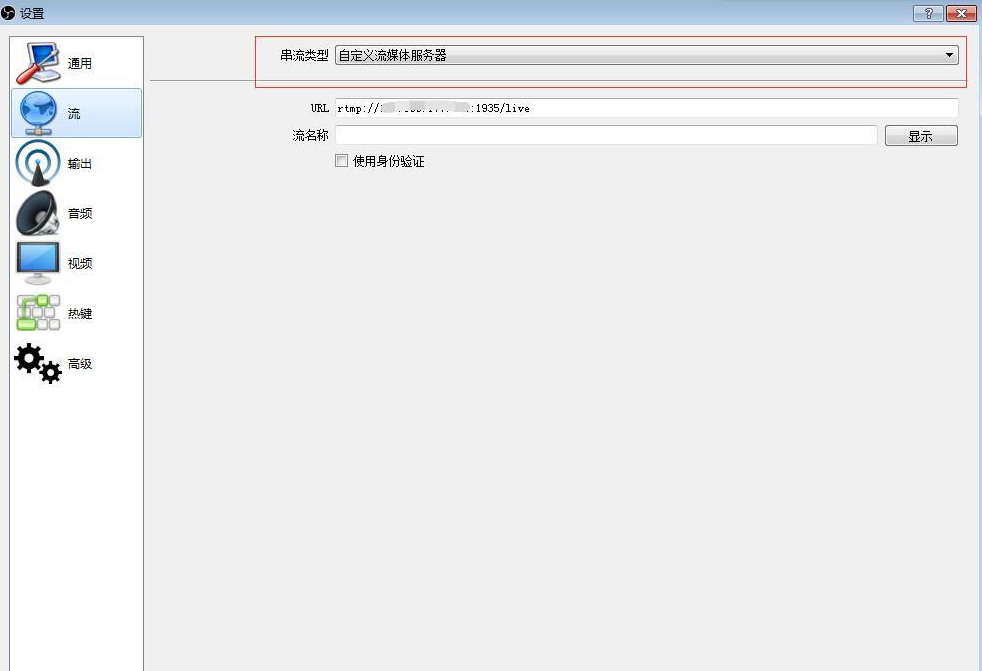
设置完成我们就可以 开始推流了。
# 14.4 拉流测试地址
推荐一个拉流的测试地址,里面针对各种协议都能测试拉流测试,需要注意图中几个地方,由于我们使用的rtmp协议,我们选择这一栏,底下填写我们推流的地址和我们在上面obs的设置里面配置的流的名称,start, ok搞定!!!
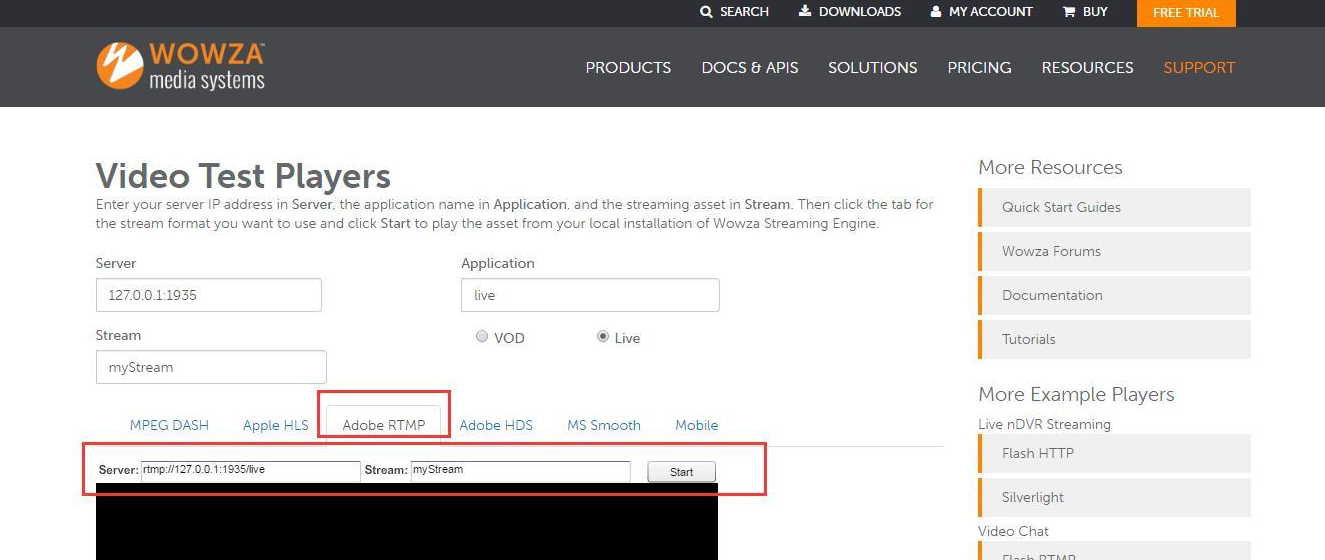
好了,相信各位小伙伴们对使用Nginx搭建流媒体服务器实现直播,有了进一步的了解,我是冰河,我们下期见~~